How to compare fairly: same income, same assumptions
Every figure in this comparison uses one set of assumptions, so the differences below are product differences, not arithmetic differences: tax year 2026, single filer, no W-2 wages, no other income, standard deduction, no children and no credits. Where a product's own published table uses different assumptions, this guide says so instead of silently adjusting the numbers. The benchmark table is Keeper Tax's six published income levels, recomputed with the QBI deduction taken as the smaller of 20% of QBI and 20% of taxable income before the QBI deduction — the rule the sources and formula guide derives from the IRS rules.
| 1099 income | Self-employment tax | Federal income tax | Total | Share of income |
|---|---|---|---|---|
| $20,000 | $2,826 | $199 | $3,025 | 15.1% |
| $40,000 | $5,652 | $1,775 | $7,427 | 18.6% |
| $60,000 | $8,478 | $3,559 | $12,037 | 20.1% |
| $80,000 | $11,304 | $5,344 | $16,647 | 20.8% |
| $100,000 | $14,130 | $8,235 | $22,365 | 22.4% |
| $150,000 | $21,194 | $16,413 | $37,608 | 25.1% |
The footnote that matters most: QBI must be computed as the smaller of the two 20% figures. Computing it simply as 20% of net income gives a $60,000 federal income tax of about $3,071 instead of $3,559 — an error of $488 in the taxpayer's favour that would surface at filing time. Any comparison that does not state its QBI method is not yet a comparison. Keep that test in hand for the rest of this article.
Estimates only — not tax advice. The totals in this article are planning estimates under the stated assumptions. Your own figures will differ with expenses, filing status, W-2 wages, credits, and state tax, which version 1 of the BeadCalc tool does not estimate.
Keeper Tax: the benchmark table, plus filing and bookkeeping
Keeper Tax is the benchmark for this comparison because it publishes the most complete freelancer picture: it computes self-employment tax in its parts, and its tax service covers federal and state filing. Its quarterly-payment scheduling, however, is not in every tier: quarterly estimated-payment arrangements are included in the Premium tier and above — Premium is the lowest tier that includes them — but not in Bookkeeping Only or Standard. Its product also supports uploading 1099 forms and bank statements or spreadsheets, which matters for freelancers whose records live in a bank feed rather than a spreadsheet.
Keeper's published pricing, taken from its official pricing page, is: Bookkeeping Only at $20 per month, Standard at $199 per year, and Premium at $399 per year, with a 14-day free trial. Older third-party prices circulate online; this guide uses the official page only, because reseller and review-site prices go stale without notice. What Keeper's public pages do not describe is a printable quarterly plan: this guide found no print statement for a quarterly schedule in Keeper's public text, so it does not claim one.
The six-level table above is Keeper's published shape, verified against the 2026 rules: self-employment tax rises almost exactly in proportion to income (it is a flat-rate tax up to the wage base), while federal income tax rises faster, because each extra dollar is taxed at a higher marginal slice and the standard deduction is fixed. That is why the total share climbs from 15.1% at $20,000 to 25.1% at $150,000: the income-tax half does the climbing.
TurboTax Self-Employed: filing power, and a price trap
TurboTax Self-Employed is a filing product first and a calculator second. Its verified scope includes self-employment tax computation, Schedule C preparation, 1099-NEC reporting, and quarterly estimated-tax support. Expense import works through QuickBooks or spreadsheets — not, as some summaries claim, through direct upload of 1099 images or bank statements with automatic recognition. If your records are a pile of PDFs, that distinction decides how much manual work filing will take.
TurboTax's DIY price is stated here only because it was checked against TurboTax's own DIY Premium page on October 27, 2026, not against third-party roundups (those conflict outright on the DIY price and cannot all be current): DIY Premium lists $139 federal, with state filing additional at $64 per state. Treat that as a dated observation, not a permanent price — TurboTax prices carry conditions and change, so check the official page for the tier you actually intend to use before filing. It also warns against the most common mix-up: TurboTax's Expert-assist line is a different product line from DIY, with its own pricing — for example, Expert Assist Business for sole proprietors lists $229 federal — and that figure must not be quoted as if it were the DIY price. The two lines differ in what a human does for you, so their prices are not comparable.
One more exclusion to know before you click: TurboTax Free Edition does not cover self-employment. Business income and 1099-NEC income are explicitly outside the Free Edition, so a freelancer who starts there will be routed to a paid tier before filing. That is not a hidden fee; it is a scope boundary, but it surprises people who arrive expecting a free filing.
As with Keeper, this guide found no verified print statement for a TurboTax quarterly plan in the public text checked, so it claims none. Printability is a BeadCalc-side feature in this comparison, not an industry standard.
1099taxestimator.tax: free, fast, and missing the QBI deduction
1099taxestimator.tax is a different species from the other two: a free calculator that runs entirely in the browser, with no account, no uploads and no filing capability. For a quick sense of a bill it is genuinely useful, and its price — free — is not a trial or a tier. Its state estimates, by its own description, are built from each state's progressive brackets, which is why it can show a state figure where BeadCalc version 1 shows none.
Two qualifications change how its numbers must be read. First, its quarterly figure is a simple split — the main calculator's total divided by four — not a safe-harbor computation against last year's tax, so it plans cash flow without protecting against underpayment penalties. Second, and more important, its main table explicitly does not include the QBI deduction. That single omission explains the largest gap in this comparison: at $100,000 of income, its federal income tax is $11,616, against Keeper's $8,235. The $3,381 difference is mostly the QBI deduction, not a disagreement about brackets. Comparing those two figures directly, without naming the QBI difference, would mislead by thousands of dollars.
The same caution applies in reverse: a tool that includes QBI will always look cheaper than one that does not, on identical income. The honest question is never which total is lower; it is which total includes the deductions you are actually entitled to. The sources and formula guide shows the QBI computation that produces the $8,235 figure, so you can check it rather than trust it.
Side by side: what each product actually does
| Feature | BeadCalc (v1) | Keeper Tax | TurboTax Self-Employed | 1099taxestimator.tax |
|---|---|---|---|---|
| Self-employment tax breakdown | Yes, Social Security and Medicare separately | Yes | Yes | Yes |
| QBI deduction in the federal figure | Yes, smaller-of-two-20% rule | Yes | Yes, via filing | No, main table excludes it |
| Quarterly payment plan | Yes, printable and downloadable | Premium tier and above | Yes, quarterly estimates | Yes, total ÷ 4 simple split |
| State tax estimate | No, not in v1 | Yes, via tax service | Yes, via filing | Yes, per its state-bracket description |
| Filing a return | No | Yes, federal and state | Yes, Schedule C and 1099-NEC | No |
| Uploads | None, nothing is uploaded | 1099s, bank statements, spreadsheets | QuickBooks and spreadsheet import | None |
| Price | Free | $20/mo, $199/yr, $399/yr tiers; 14-day trial | DIY Premium $139 federal, state $64 per state extra (official page, Oct 27, 2026); Free Edition excludes self-employment | Free |
Read the table by column, not by row count. Keeper and TurboTax are filing products with calculation attached; BeadCalc and 1099taxestimator.tax are calculators with no filing attached. Within the calculators, the honest split is QBI and state: BeadCalc includes QBI and excludes state, while 1099taxestimator.tax includes a state figure and excludes QBI. Neither is wrong; they are built for different questions, and the comparison above exists so you do not mistake one question's answer for the other's.
Where BeadCalc differs, stated plainly
BeadCalc's differences are narrow and verifiable. It gives a complete federal breakdown — self-employment tax split into Social Security and Medicare, federal income tax after the standard deduction and the QBI deduction, the total, and the effective rate — with a quarterly plan you can print or download as a plain-text file. It reflects the 2026 rules, including the new $2,000 1099 reporting threshold and the 2026 brackets and wage base. And it uploads nothing: the calculation runs in your browser, with no account and no documents leaving your device.
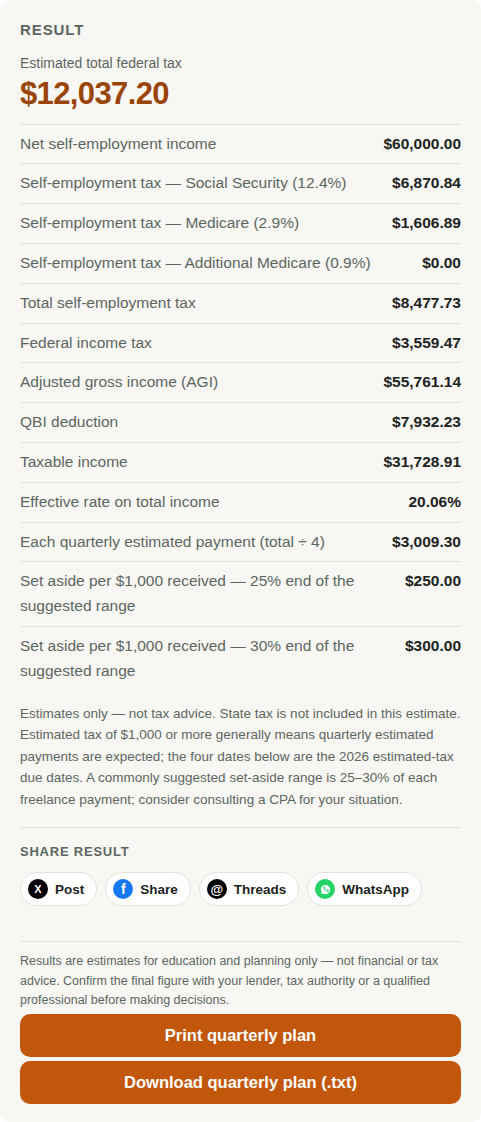
What BeadCalc does not do in version 1 is equally plain. State tax is not included in this estimate, and the tool has no state selector: state tax rates and state estimated-payment dates will only be added after verification against each state tax authority. It does not file a return, and it does not import your records — you enter five figures by hand. If you need filing, Keeper or TurboTax is the next step after estimating; if you need a state figure today, 1099taxestimator.tax gives one with the QBI caveat above. The how-to-use guide walks through those five inputs in order.
A final practical rule for any comparison you run yourself: re-run all candidates on the same income, with the same expenses and filing status, and check two lines before trusting any total — whether QBI is included, and whether the quarterly figure is a safe-harbor amount or a simple division by four. Those two checks explain nearly every headline gap in this market.
Frequently asked questions
Why is Keeper's $100,000 federal income tax $8,235 while 1099taxestimator.tax shows $11,616?
Mainly the QBI deduction. Keeper's figure includes QBI, computed as the smaller of 20% of QBI and 20% of taxable income before the QBI deduction; 1099taxestimator.tax states that its main table does not include the QBI deduction. The $3,381 gap is mostly that deduction, not a disagreement about tax brackets, so the two figures must not be compared directly.
Can I get a TurboTax Self-Employed price from this comparison?
Yes, with a date on it. TurboTax's own DIY Premium page listed $139 federal, with state filing additional at $64 per state, when checked on October 27, 2026. Third-party roundups conflict on this price, so this guide uses the official page only — and TurboTax prices change, so check the official page for the tier you actually intend to use before filing. The Expert-assist line is a different product with its own pricing and must not be quoted as the DIY price.
Does Keeper include quarterly payments in every tier?
No. Quarterly estimated-payment arrangements are included in Keeper's Premium tier and above — Premium is the lowest tier that includes them. Bookkeeping Only and Standard cover bookkeeping or filing without the quarterly scheduling, so check the tier before assuming the quarterly plan is included.
Is BeadCalc's quarterly plan the same as a safe-harbor calculation?
No. Version 1 divides the estimated annual total into four equal payments for planning. The penalty-safe amount depends on last year's tax — generally 100% of it, or 110% when the prior year's AGI was above $150,000 — and on when income arrived during the year. Equal quarters help cash flow; the safe-harbor rules are what protect against underpayment penalties.
Which tool should a first-year freelancer start with?
Start with a free calculator to learn the shape of the bill — self-employment tax plus income tax, and the quarterly rhythm — then move to a filing product when you are ready to file. The first-year mistakes guide shows the three errors that cost new freelancers the most, and none of them is choosing the wrong calculator.
Run the numbers yourself
Compare on your own figures: the full federal breakdown with a printable quarterly plan, no account, nothing uploaded.
Estimates only — not tax advice. Competitor features and prices in this article reflect the public pages checked for this comparison and can change; verify the current tier and price on each provider's own site before buying. BeadCalc version 1 estimates federal tax only; state tax is not included.